Showing posts with label PicLab. Show all posts

Thursday, July 4, 2013

Just call us, we'll might call you - How to add Pictures Lab to your App

Windows Phone 8 introduced a nice new feature called File and Uri associations. This feature makes it possible to register an app for certain file extensions and Uri protocols. A couple of apps already support it and Nokia has a nice site which lists a couple.

Pictures Lab recently added support for that as well and uses it to call the app Instagraph. This means with the help of that app Pictures Lab now provides posting / sharing on Instagram. But that's not all, Pictures Lab also supports inbound Uri associations, so you can pass an image to Pictures Lab through the mechanism of an Uri association pretty easily.


How it works
In order to call Pictures Lab from an app this scheme has to be used:

pictureslab:edit?Name=fileNameinthemedialib[&ClientId=ProductIdFromStore]
or
images:edit?Name=fileNameinthemedialib[&ClientId=ProductIdFromStore]
  • fileNameinthemedialib:
    This is the filename of the image in the Media library / Pictures Hub. It does not matter if the file extension like .jpg is provided or not. 
  • ClientId:
    This is an optional parameter. If it's provided then it should be the GUID that also matches the store product Id. It's not used in Pictures Lab now, but might be useful in the future to know the source of the protocol call and one could also use it to build a link like that: http://www.windowsphone.com/s?appid=ClientId

or to just launch Pictures Lab without passing an image:
pictureslab:launch

Sample code:

var photoChooser = new PhotoChooserTask();
photoChooser.Completed += async (sender, e) =>
{
   // When the user selected a photo, pass the filename on to Pictures Lab for editing
   var uri = string.Format("images:edit?Name={0}&Clientid={1}", 
             System.IO.Path.GetFileName(e.OriginalFileName), 
             "9902dac1-c001-440b-add5-f38446b35676");
   // uri = "images:edit?Name=WP_20130527_009&Clientid=9902dac1-c001-440b-add5-f38446b35676" 
   var wasSuccess = await Windows.System.Launcher.LaunchUriAsync(new System.Uri(uri));
};
photoChooser.Show();

Note, it's not necessary to UrlEncode the Uri, the Windows Phone platform handles it automatically. If the user has Pictures Lab not installed and the above Uri is called, the Windows Phone OS is also smart enough to show the user a dialog which asks to search for an app in the Store that can handle the protocol. This will bring up Pictures Lab.

Conclusion
The concept of Uri associations is like the little brother of Windows 8's Share Charm, but it's still quite powerful and gives us app developers a nice way to combine our apps and make it a seamless UX. It's a win for the user and therefore it could be a win-win situation for the involved apps.

Future
For a next version I'm also thinking about a callback scenario. The user story would be: A user opens app A and wants to edit an image, this will open Pictures Lab, when the user is done with editing, Pictures Lab will call app A again. The user is back in app A with the edited image.
This callback mechanism would probably use a Callback parameter in the scheme above where app A can provide the UrlEncoded callback Uri with a placeholder for the edited pictureName. Something like that:

images:edit?Name=MyInputImageName.jpg&Callback=myapp%3Apost%3FName%3D%7B0%7D
The Url decoded part of the Callback: myapp:post?Name={0}
This callback format string will be used in Pictures Lab to call app A and pass the edited picture back.

Makes sense?
Please let me know your thoughts and if that would be useful. Feel free to comment or reach out to me through any channel.

Friday, January 13, 2012

Breakdown of Windows Phone App Download Statistics

Line Graph by Scott Lewis, Noun
In this blog post I want to share the download graph of my quite successful Windows Phone app Pictures Lab and my conclusions. Some of you might have seen a similar graph already on Twitter or on Facebook, but I thought an update and a bit more explanation might probably make sense.


The graph below shows the download statistics of my Pictures Lab app during the last 9 months. The green line represents the daily downloads and the orange are the accumulated downloads. I blurred the numbers at the scales, since I don't release the download number for various reasons. Please note, Pictures Lab offers a trial mode which means users can try the app for free. Therefore the download numbers aren't equal to the number of sold licenses! Although the app has a pretty good conversion rate from trial-to-paid of ~32% worldwide average and in December it even was 97% in Norway! I noticed that all the Scandinavian countries seem to have a great conversion rate in general. Worst seems to be Hong Kong, but that's a story for a different blog post. Just to be clear, Pictures Lab provides me with a solid extra income each month and the trend is positive, but it's not enough to make a living out of that yet.
The absolute download numbers actually don't matter that much for this blog post. The important part of the graph are the text labels I manually added. Those labels mark events I tracked and noted at that time and are usually followed by a download peak.

Pictures Lab download graph from 04-01-2011 to 01-07-2012 (click on the image for the original size).

My conclusions
  1. Steadily releasing updates with new functionality and being featured at the Windows Phone sites has a big impact on the downloads. Keep in mind the major Pictures Lab updates were featured at least at 3-5 of the top Windows Phone sites.
  2. Being featured at the Marketplace also has a significant positive impact on downloads. Of course this depends on how big the local Marketplace is. Unfortunately does the AppHub not provide the information when an app has been featured. There is the Distimo service which tracks that too, but that service needs your live id credentials and I won't give a 3rd party site my live id to store it in their database. Fortunately some of my friends ping me when they see my apps being featured in their local marketplace. I think it's pretty much safe to say that all the graph peaks without a label nearby are related to a Marketplace feature.  
  3. The base line increased not only after the 3.0, but also after the peak of the 4.0 update. The 4.0 update brought the multi-language support with 10 languages. The steady download jump after 4.0 is a pretty good indication that localization can help to increase downloads.
  4. The price drop to $0.99 was followed by the highest peak in the graph, but after that it went down pretty quickly. I think the price point is the hardest thing to get right and it largely varies for different kind of apps, so the above Pictures Lab pricing information shouldn't be generalized.   
  5. Of course Christmas, the holidays and New Year also resulted in nice peaks. Customers have time to browse the marketplace or just want to fill up their brand new Windows Phones with some apps.

What about the Windows Phone 7.5?
The first Windows Phone 7.5 (previously known as Mango) devices and Nokia hit the market in October and November 2011. This fact also needs to be considered when interpreting the graph. Although from looking at the statistics of my other apps I see that Windows Phone 7.5 didn't have such a huge impact like the updates had. The downloads definitely increased due to the Windows Phone 7.5 launch, but the tracked events align very well with the peaks in the graph and the increase of the base line after.
Let me try to clarify this and my conclusion #3 with the graphs of my successful Helium Voice Free app and my not so successful Benchmark Free app.

Helium Voice Free got a nice update in November, but I didn't inform the Windows Phone sites, so there are no peaks in the graph. You can see that the release of Windows Phone 7.5 slightly increased the downloads and the downward trend turned into an upward trend.

Helium Voice Free graph from 04-01-2011 to 01-07-2012 (click on the image for the original size to see numbers).


In the Benchmark Free download graph there's also this small increase of the average downloads around the Windows Phone 7.5 device launch, but it's not as much as after the updates of Pictures Lab.

Benchmark Free graph from 04-01-2011 to 01-07-2012 (click on the image for the original size).


Considering all that information, I think this means the Windows Phone 7.5 launch of course raised the downloads base line, but the Pictures Lab updates had a bigger impact on the downloads and it's not only the Windows Phone 7.5 launch which raised the average downloads of Pictures Lab.
Keep in mind that such a statistical analysis isn't bullet-proof at all, esp. when there's not all the information available like the date of all marketplace features and more. Please also note not all apps are the same and things that work for Pictures Lab or Helium Voice Free don't necessarily need to be valid for other apps.

Makes sense?
What are your conclusions?
What is your experience?


Thank you!
I would like to thank all the users of the app, the great group of translators who helped me to translate Pictures Lab, the beta testers and not at last all the great Windows Phone sites which keep us informed about all the things happening around Windows Phone and help us developers by informing the world about our apps. Keep it up!

Monday, December 5, 2011

Windows Phone Sites Around the World

I recently released an update of my Windows Phone app Pictures Lab which brings some nice new features like effect combination, two Christmas and a New Year frame and most importantly 7 new languages. Pictures Lab 4.0 now supports 9 languages: English, German, Japanese, Russian, Dutch, French, Italian, Spanish, Portuguese. This was made possible by a group of awesome native-speaking translators: Alan Mendelevich, Takeshi Miyauchi, David Salazar, Joost van Schaik, Johan Peeters, Paolo Barone, Simone Chiaretta, Pedro Lamas and Quentin Calvez.


I also asked my translators if they know any local Windows Phone news sites / blogs. Below is a list of international and regional Windows Phone news sites we collected. Note, that those are primarily consumer sites read by consumers and not only for developers. This list could be useful if you plan to release a localized version of your app and want to promote it a bit. Most sites have a "Tip Us" or contact form and are mostly happy about new content to write posts about.

Forget this list! 
Head over to @ailon's awesome dedicated site: http://windowsphonesites.com

English
German
Russian
Japanese
Dutch
Spanish
Portuguese (Brazilian)
Italian
French
Danish

If you know more sites, please leave a comment and I'll update the list.

Telerik published a nice whitepaper with more resources about app promotion.

Monday, January 17, 2011

Stay in Touch - How to Contact Your Marketplace Customers

Photo (CC) by  LarimdaME
A while ago I provided some methods and code snippets on how to get feedback from users. Today I show a manual procedure how you can contact some of the customers that reviewed your Windows Phone app. Some might already know this, but not all developers are aware of this Marketplace / Zune functionality, so I though it might be worth sharing.

Most customers are nice people that provide valuable feedback also through the Marketplace review mechanism. Others give you bad reviews and it seems like they might have misunderstood the functionality. And some people just love to rant. Just like in real life. If I feel the urge to contact some of the reviewers, I send a message through the Zune social network and ask for details. Unfortunately, not all review authors are registered there and only ~50% of the people can be found by their username.

Step by Step
1. Go to http://wp7reviews.tomverhoeff.com and enter the Product Id of your app.
This neat little Silverlight app will list all reviews from around the world. I recommend you bookmark the URL with the Product Id.
2. Sort the grid by date, go through the list and copy the username of the reviewer you want to contact.


3. Open the Zune software, go to the Marketplace tab, paste the username into the search field and hit the search button.


4. If the user was found, click on the user's profile.


5. Open the user's profile and send the user a message through Zune ("Send message").


Conclusion
That's it. Not the best solution and you will only reach ~50% of the users, but better than nothing. I would prefer if app developers could comment the reviews.
Please stay professional and don't offend the review authors even if they have written nonsense.

Monday, December 20, 2010

Listen to your Phone - Getting User Feedback with System Information

Two weeks ago I've blogged about a trick my Windows Phone Pictures Lab app uses to detect if the Zune software is running. Today I have a handful of classes that help to gather system information and provide an easy interface for the email task. No magic at all, but I though it might be helpful for others too.
I use these helpers in Pictures Lab for the user feedback functionality. I got a lot of valuable feedback and great suggestions via this feature.
The user can invoke this functionality on the about page of the app and it's also fired when an unhandled exception occurred and the user wants to send error details.

System Information
It's always useful to include some system, version and device information in such a feedback report. That's why I wrote a SytemInformation class which queries some paramteres and creates a nice, human readable string.
public class SystemInformation
{
   public static string Dump()
   {
      var builder = new StringBuilder();
      builder.AppendLine("***** System Infos *****");
      builder.AppendLine();
      builder.AppendFormat("Time: {0}", DateTime.Now.ToUniversalTime().ToString("r"));
      builder.AppendLine();
      builder.AppendFormat("Culture: {0}", CultureInfo.CurrentCulture);
      builder.AppendLine(); 
      builder.AppendFormat("App Version: {0}", WmAppManifestHelper.GetVersion());
      builder.AppendLine();  
      builder.AppendFormat("Manufacturer: {0}", DevicePropertiesHelper.GetDeviceManufacturer());
      builder.AppendLine(); 
      builder.AppendFormat("Model: {0}", DevicePropertiesHelper.GetDeviceModel());
      builder.AppendLine(); 
      builder.AppendFormat("DeviceHardwareVersion: {0}", DevicePropertiesHelper.GeDeviceHardwareVersion());
      builder.AppendLine(); 
      builder.AppendFormat("DeviceFirmwareVersion: {0}", DevicePropertiesHelper.GeDeviceFirmwareVersion());
      builder.AppendLine(); 
      builder.AppendFormat("OS  Version: {0}", Environment.OSVersion);
      builder.AppendLine(); 
      builder.AppendFormat("CLR Version: {0}", Environment.Version);
      builder.AppendLine(); 
      builder.AppendFormat("Device Type: {0}", Microsoft.Devices.Environment.DeviceType);
      builder.AppendLine(); 
      builder.AppendFormat("Network Type: {0}", NetworkInterface.NetworkInterfaceType);
      builder.AppendLine(); 
      builder.AppendFormat("DeviceTotalMemory: {0:f3} MB", DevicePropertiesHelper.GetTotalMemoryMb());
      builder.AppendLine(); 
      builder.AppendFormat("ApplicationPeakMemoryUsage: {0:f3} MB", DevicePropertiesHelper.GetPeakMemoryUsageMb());
      builder.AppendLine(); 
      builder.AppendFormat("ApplicationCurrentMemoryUsage: {0:f3} MB", DevicePropertiesHelper.GetCurrentMemoryUsageMb());
      builder.AppendLine(); 
      using (var appStorage = IsolatedStorageFile.GetUserStoreForApplication())
      {
         builder.AppendFormat("Iso Storage AvailableFreeSpace: {0:f3} MB", appStorage.AvailableFreeSpace / 1024f / 1024f);
         builder.AppendLine();
      }
      return builder.ToString();
   }
}
As you can see a few interesting properties from the OS, the device and its configuration and memory status are queried. This is done with built-in and custom helper classes.
The WmAppManifestHelper class parses the WmAppManifest.xml file and provides the app version and other properties from this file. The DevicePropertiesHelper wraps the DeviceExtendedProperties class and the available property keys. I added all the keys I need, but not more (YAGNI). However, if you add more property keys to the class, please make sure to post a comment.


Email Service
The EmailService class wraps the EmailComposeTask and adds the system infos to the body of the email.
public class EmailService
{
   private readonly EmailComposeTask emailComposeTask;

   public string Addressee { get; set; }

   public EmailService()
   {      
      Addressee = "foo@bar.com";
      emailComposeTask = new EmailComposeTask();
   }

   public void ShowTask(string subject, string body)
   {
      // Add system infos add the end of the email
      body += Environment.NewLine;
      body += Environment.NewLine;
      body += Environment.NewLine;
      body += Environment.NewLine;
      body += SystemInformation.Dump();

      // Fill email
      emailComposeTask.To = Addressee;
      emailComposeTask.Subject = subject;
      emailComposeTask.Body = body;

      // Invoke Mail Task
      emailComposeTask.Show();
   }
}
The ShowTask method sets the properties of the EmailCompoaseTask and opens it. The addressee can be defined with the corresponding property.


Please replace the foo@bar.com default value for Addressee with your email address. Think about the poor Foo at bar.com.


Handling the Unhandled
This email functionality is used to enable explicit user feedback when the user taps the 'submit feedback' button. It is also utilized in the UnhandledException event handler of the Application class. The default body of the event handler in the App.xaml.cs file is generated by Visual Studio when a new Windows Phone Application project is created. Just add the email service and set the e.Handled property to true.
private static void Application_UnhandledException(object sender, ApplicationUnhandledExceptionEventArgs e)
{
   var result = MessageBox.Show("An error occured. Do you want to send the error details to the developer?", "Meh", MessageBoxButton.OKCancel);
   if (result == MessageBoxResult.OK)
   {
      new EmailService().ShowTask("App error", e.ExceptionObject.ToString());
   } 
   e.Handled = true;
}

The body of such an error email would then look like this
System.ArgumentException: The parameter is incorrect. 
   at MS.Internal.XcpImports.CheckHResult(UInt32 hr)
   at MS.Internal.XcpImports.SetValue(INativeCoreTypeWrapper obj, DependencyProperty property, DependencyObject doh)
   at MS.Internal.XcpImports.SetValue(INativeCoreTypeWrapper doh, DependencyProperty property, Object obj)
...


***** System Infos *****

Time: 12/11/2010 5:50:02 PM
Culture: en-US
App Version: 1.9.0.0
Manufacturer: SAMSUNG
Modell: SGH-i917
DeviceHardwareVersion: 3.1.0.7
DeviceFirmwareVersion: 2103.10.10.1
OS  Version: Microsoft Windows CE 7.0.7004
CLR Version: 3.7.10218.0
Device Type: Device
Network Type: MobileBroadbandGsm
DeviceTotalMemory: 475.469 MB
ApplicationPeakMemoryUsage: 63.055 MB
ApplicationCurrentMemoryUsage: 41.223 MB
Iso Storage AvailableFreeSpace: 601.641 MB

Conclusion
User feedback is always valuable and every serious Windows Phone developer should at least add a simple functionality like the one presented here.

Source Code
You can download all mentioned classes here. Please comment if you know more useful system infos that should be included.

Thursday, December 9, 2010

Windows Phone Unplugged - How to Detect the Zune Software

I've been blogging about Windows Phone development since the first CTP version and also blogged about the photo and camera API.
This post will cover a little trick my Pictures Lab app uses to detect if the Zune software is running when the device is connected to the PC. This is important because the device's media Hubs can't be accessed when the device is connected and the Zune software is running. The same is true for the media APIs (PhotoChooser, MediaLibrary, ...).
The Pictures Hub and the Zune Hub show a little animation when you try to open these while Zune is running. Unfortunately there's no built-in method to detect this in code.

An app mostly performs the classic IPO Model operations: load, process, save. The load and save steps can fail when Zune is connected. The following two code snippets show how to detect if the Zune software is running and ask the user to close it. I use the PhotoChooser and MediaLibrary here to demonstrate this exemplarily for picture handling, but the same is also valid for other media like audio.

Save fail
If the device is connected to the PC and the Zune software is running, an InvaildOperationException is thrown.
By the way, this blog post covered how to save a WriteableBitmap as JPEG to the device's media library.

private static void Save(WriteableBitmap bitmap)
{
   try
   {
      SaveToMediaLibrary(bitmap, "mySuperCoolPic.jpg");
   }
   catch (InvalidOperationException)
   {
      MessageBox.Show("The Zune software is running and the picture can't be saved. Please close Zune or disconnect the phone.");
   }
}
This is quite straightforward.


Load fail
Unfortunately it's not that easy to detect if the Zune software is running when a picture is opened through the PhotoChooserTask API. (How to use this Task was also covered here.)

Some users contacted me when they tried to open a photo with Pictures Lab and nothing happened. The problem is that the picture viewer just won't open when the PhotoChooserTask.Show method is called and Zune is running on the PC. There's no built-in feedback here. I implemented the following code in the Completed event handler of the PhotoChooserTask to get a better user experience.

private void PhotoProviderTaskCompleted(object sender, PhotoResult e)
{
   try
   {
      if (e != null)
      {
         if (e.TaskResult == TaskResult.OK)
         {
            // Do something with the JPEG stream in e.ChosenPhoto
         }
         else if (e.Error is InvalidOperationException)
         {
            throw e.Error;
         }
         else if (e.TaskResult == TaskResult.Cancel)
         {
            // Try to get an image from the Pictures Hub. 
            // If this fails, the device is connected and Zune is running.
            var pictures = new MediaLibrary().Pictures;
            if(pictures.Count > 0)
            {
               pictures[0].GetThumbnail();
            }
         }
      }
   }
   catch (InvalidOperationException)
   {
      MessageBox.Show("The Zune software is running and the picture can't be saved. Please close Zune or disconnect the phone.");
   }
}
One might wonder why the MediaLibrary is queried when the PhotoResult EventArgs has the Error property. Unfortunately it's not used when Zune is running, only the TaskResult is set to Cancel in this case. This TaskResult value is also used when the user presses the back button while choosing a photo and it's not clear why the TaskResult was set to Cancel.

Fin
That's it.
I hope it helps.
Let me know if you found a better way.

The above photo was taken with a HTC Mozart and edited with Pictures Lab (cropped and Lomo effect).

Tuesday, November 2, 2010

Tracking Sales Statistics with the Silverlight Analytics Framework for Windows Phone

The official statistics are now available at the App Hub portal. However, this approach is capable of more than sales tracking.

Are you a Windows Phone developer? Are you also curious how well your app performs in the Windows Phone Marketplace? I am!
Some might say it doesn't matter yet, since there aren't many devices out there, but nevertheless I'd like to know my statistics. Also O2 Germany recently reported they have sold out the first batch of HTC HD7 devices with sales in the 5-figure range. Unfortunately we won't see official statistics from the Marketplace any time soon. An App Hub forum member contacted the Microsoft App Hub support and they told him that sales statistics won't be available before January 2011. Bummer!
Fortunately we are app developers and we can implement our own statistic tracking. On the other hand this means we have to setup and pay some service and implement tracking code. Here is where the Silverlight Analytics Framework and Google Analytics come to the rescue.
This blog post provides a step-by-step guide on how to track your app (sales) statistics with the Silverlight Analystics Framework and Google Analystics. Did I mention it's free and not only free for a limited period?
Let's go...

Setup Google Analytics
If you don't have a Google Analytics account, just sign up here. It's free.
  1. Create an empty HTML page with the minimum tags and upload it to some public webspace. If you don't have webspace available, just create a free Dropbox account and put the page in the public folder.

  2. Go to Google Analytics and use the "Add Website Profile" functionality. Choose "Add a Profile for a new domain". Enter the URL of the dummy website.

  3. The next page setup page will show the necessary Java Script tracking code. Copy the code, paste it into the dummy website and upload the website.

  4. Your website profile is now waiting for activation. Go back to the overview and click the Edit link of your website profile. See the little yellow exclamation mark with the text "Tracking Not Installed" at the upper right corner. Click on "Check Status". The status should change soon and the profile will become active. If not, give Google a couple of minutes and retry it then.


Setup the Silverlight Analytics Framework
Now it's time to submit the tracking events from your app to Google Analytics. This task is pretty easy with the help of the Silverlight Analytics Framework.
The Silverlight Analytics Framework is an extensible web analytics framework mainly developed by the Microsoft evangelist Michael S. Scherotter. It's really nice, designed in a flexible way with the use of modern technologies and open source. Google Analytics is just one of the many supported analytics services.
  1. Download the latest version from the Codeplex site and install it or download the latest source code from the repository and build it yourself. I've chosen the latter since Michael recently implemented a nice feature: The Silverlight Analytics Framework for Windows Phone tracks each page view by default. In the changeset 63020 Michael added an IsPageTracking property which allows to disable the page tracking. This feature is part of the latest release 1.4.8.

  2. Add the following assembly references to your project.
    From the Silverlight for Windows Phone Framework: System.Device, System.Windows.Interactivity
    From the Silverlight Analytics Framework: Microsoft.WebAnalytics, Microsoft.WebAnalytics.Behaviors, Google.WebAnalytics, System.ComponentModel.Composition, System.ComponentModel.Composition.Initialization

  3. Create a new class in your project:
    public class AnalyticsService : IApplicationService
    {
       public void StartService(ApplicationServiceContext context)
       {
          // Wire up MEF
          CompositionHost.Initialize(
             new AssemblyCatalog(
                Application.Current.GetType().Assembly),
                new AssemblyCatalog(typeof(Microsoft.WebAnalytics.AnalyticsEvent).Assembly),
                new AssemblyCatalog(typeof(Microsoft.WebAnalytics.Behaviors.TrackAction).Assembly));
       }
    
       public void StopService() { }
    }
    

  4. Go to the App.xaml file of your project and add the namespace definitions to the first tag:
    <Application
        x:Class="MyApp.App"
        xmlns="http://schemas.microsoft.com/winfx/2006/xaml/presentation"    
        xmlns:shell="clr-namespace:Microsoft.Phone.Shell;assembly=Microsoft.Phone"
        xmlns:x="http://schemas.microsoft.com/winfx/2006/xaml"
    
        
        xmlns:local="clr-namespace:MyApp"
        xmlns:ga="clr-namespace:Google.WebAnalytics;assembly=Google.WebAnalytics"
        xmlns:mpc="clr-namespace:Microsoft.Phone.Controls;assembly=Microsoft.Phone"
        xmlns:mwa="clr-namespace:Microsoft.WebAnalytics;assembly=Microsoft.WebAnalytics"
        >
    
  5. Then add the service references inside the Application.ApplicationLifetimeObjects declaration in your App.xaml file:
    <Application.ApplicationLifetimeObjects>    
        <local:AnalyticsService />
        <mwa:WebAnalyticsService IsPageTrackingEnabled="False">
            <mwa:WebAnalyticsService.Services>
                <ga:GoogleAnalytics WebPropertyId="UA-XXXXXXX-X" />
            </mwa:WebAnalyticsService.Services>
        </mwa:WebAnalyticsService>
    </Application.ApplicationLifetimeObjects>
    
    Most important you need to replace the WebPropertyId in the GoogleAnalytics element with the Id of your newly created Google Analytics website profile.
    I'm not interested in the page tracking, therefore I've set the IsPageTrackingEnabled property to False. You should also keep in mind that page tracking has an impact on the performance of the app. I recommend to disable it.
     
  6. Since your app is now using a network connection, you need to add the ID_CAP_NETWORKING capability to your WMAppManifest.xml file. 
That was all to get the Silverlight Analytics Framework connected to your Google Analytics profile. It now tracks the Deactivated, Activated and Started events.
You can find the results here:

Please keep in mind that it usually takes 12 - 24 hours until the tracked data shows up in Google Analytics.


Add sales tracking
There's only one puzzle piece left now, the actual sales tracking. I use two Windows Phone APIs for this. First the LicenseInformation.IsTrial method which tells us if the app runs in trial mode or if it was paid. The second API is the DeviceExtendedProperties class with the DeviceUniqueId key which provides a unique 20 byte long hash for the phone. Such an id is needed to count unique installations.
  1. Add a new class to your project for the explicit tracking from code:
    public class AnalyticsHelper
    {
       // Injected by MEF   
       [Import("Log")]
       public Action<AnalyticsEvent> Log { get; set; }
    
       public AnalyticsHelper()
       {
          // Inject
          CompositionInitializer.SatisfyImports(this);
       }
    
       public void Track(string category, string name)
       {
          // Track analytics event
          Log(new AnalyticsEvent { Category = category, Name = name, });
       }
    }
    

  2. Call the Track method when your app launches and provide the necessary information.
    Add this code to the Application_Launching event handler in the App.xaml.cs file.
    private void Application_Launching(object sender, LaunchingEventArgs e)
    {
       var analyticsHelper = new AnalyticsHelper();
    
       // Get device id
       var value = (byte[])DeviceExtendedProperties.GetValue("DeviceUniqueId");
       var id = Convert.ToBase64String(value);
       
       // Track launch
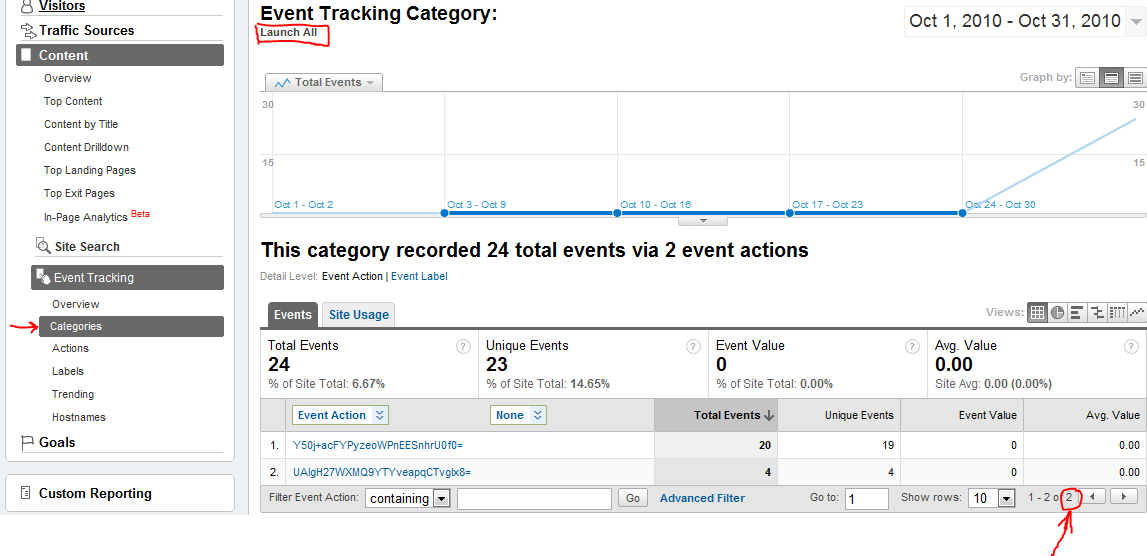
       analyticsHelper.Track("Launch All", id);
    
       // Track if paid
       if (!new LicenseInformation().IsTrial())
       {
          analyticsHelper.Track("Launch Paid", id);
       }
    }
    
    Gergely Orosz (@Gergely Orosz) gave me the idea to track the statistics only if the phone is connected to Wi-Fi. This is pretty easy to implement, just add an if condition around the tracking: NetworkInterface.NetworkInterfaceType == NetworkInterfaceType.Wireless80211

  3. The app is now using the unique id of the phone, so you have to add the ID_CAP_IDENTITY_DEVICE capability to your WMAppManifest.xml file. 

As you can see all app launches are tracked in the category "Launch All" and all paid launches in the "Launch Paid" category. This makes it easy to see all installations and all sales directly. Needless to mention that Launch Trial = Launch All - Launch Paid.
You can check if all works with the Fiddler or the TCPView tool while using the Windows Phone emulator. By the way, the tracking is pretty fast. I measured 20 to 40 ms for each Track call when the phone was connected to Wi-Fi.

The tracked events are best viewed when grouped by categories. The screenshot below shows a test with multiple launches of a phone and the emulator. The total number of events is listed at the bottom right of the table. Note that Unique Events aren't significant here since they only represent unique events for one session.

The id (event name) we supply through the AnalyticsEvent is mapped to the Google Analytics Event Action. You can find all event mappings and more info in the relevant Silverlight Analytics Framework documentation.

Conclusion
The update I submitted to the Marketplace works nicely and I hope to see some meaningful statistics in the next weeks. I think the described method is a good way to track your sales and other statistics until the App Hub team provides the official usage / sales statistics. Actually the provided tracking functionality is even useful when the App Hub team provides official statistics. And it's all free without a limited timeframe.

Monday, October 18, 2010

Pictures Lab for Windows Phone

"Windows Phones are going to be absolutely amazing devices for taking pictures and dealing with pictures." - Joe Belfiore at the official Windows Phone 7 launch event in NYC. I totally agree, they are. Just think about that each device needs to have at least a 5 megapixel camera and the little camera button with the "pocket to picture" functionality. I've been working heavily to enhance this photo experience with my kind of skills. This blog post contains information about the Windows Phone app I created and will also provide the references to how it works internally.


Download here

Pictures Lab is the ultimate picture effects app for all Windows Phone device types.
MSNBC.com: "a Swiss Army knife of photo tweaks".
Engadget.com: "a must-have for WP7 devices ... the program provides a set of amazing effects and tweaks for your photos"
Gizmodo.com : "Pictures Lab offers a ton of effects for your money."

If you like to make beautiful photos, then this app is a perfect addition to your phone’s toolset. Pictures Lab provides you with thousands of different modifications for your photos and has a camera functionality with superior features like face detection auto focus, steady mode and much more. It's also integrated as a Lens.
Pictures Lab is the original with high quality filters, features and great user experience. It's fast and responsive and you quickly get your job done with just a few moves. Often been copied, but never reached.
Microsoft uses Pictures Lab in its presentations as a "delightful app" which "Looks and feels like an integral part of Windows Phone". "Uncluttered, polished experience".

The app comes with controllable, easy-to-use, but advanced effects like different vintage and hipster-like filters, Tilt Shift (miniature faking), HDR, Lomo, Soften, Auto Adjust, Sharpen, Comic, Bulge, B&W, Sepia and many more. Dynamic previews of the effects are shown in a list, making it possible to easily pick the right one. The high quality borders are also presented in a nice preview list and can be combined with any filter and any aspect ratio. Multiple effects can also be combined.
It is also possible to crop, rotate and flip images. An enhanced picture and the EXIF data can be saved to the phone’s pictures hub or shared directly on Facebook, Twitter and other social networks. Later editing is also supported. The app performs the image processing on the original picture in its original resolution, thus making it also possible to print the image or use it as desktop wallpaper.
Full Pictures Hub Apps integration and support for landscape and portrait orientation. Trial version with complete functionality only save is disabled.

    If YouTube works better for you.

Reviews
  • The well-known site Engadget lists it under The best apps, accessories, and tips. They write: "... a must-have for WP7 devices ... the program provides a set of amazing effects and tweaks for your photos ..."
  • Gizmodo included Pictures Lab in Windows Phone 7 Essential Apps, Reviewed. They also recorded a video. They write: "Your phone isn't complete until you can take photos that look like they came out of a $5 camera from 1974. Pictures Lab fortunately offers a ton of other effects for your money. $2."
  • Gizmodo Australia also featured it in the article The Best Windows Phone 7 Apps.
  • msnbc.com wrote: "The app, a Swiss Army knife of photo tweaks, will be one of my first downloads."
  • techradar.com wrote that Pictures Lab is the #1 app worth paying for: "Tilt-shift effects, crop and rotate... Pictures Lab combines the fun effects of an iPhone photo app like Hipstamatic with the useful fixes you're mostly likely to need (sharpen and - in the imminent update - crop) in a beautifully designed app that crosses the power of Silverlight with the tools of the Windows Phone 7 interface. Pick a photo, see all the possible effects as thumbnails or swipe up and down to try them one at a time."
  • msnbc.com listed it in the article: "The first Windows Phone 7 apps you should grab"
  • MSN UK listed it under the "20 top mobile phone app". And they put my fat nose on the front page. Fortunately two of my girls brought the beauty back to the page.
  • America's popular WIRED magazine with a circulation of 800,000 featured Pictures Lab in there special edition WIRED App Guide.
  • UK's popular gadget magazine T3 with a circulation of more than 60,000 featured Pictures Lab in the 02/2011 issue on the page: "Killer Apps"
  • Pictures Lab was featured in Channel 9's Hot Apps series.
  • Nokia writes "it’s the closest thing to having Photoshop on your mobile phone."
  • Nokia included Pictures Lab in Top of the Apps: 10 Hotties.
  • Softpedia featured the Windows Phone 8 update.
  • All About Windows Phone reviewed the app: "Pictures Lab is one of many photo toolboxes for your smartphone, but it's the one that I enjoy using the most." and "Very, very much recommended."
  • All About Windows Phone also reviewed the Windows Phone 8 update: "It goes significantly beyond the one shot filters typically offered in apps of this type (Nokia Creative Suite, HTC Photo Enhancer) to the point at which it's about a lot more than just fun filters."
  • Another very popular UK magazine Stuff wrote a 5 stars review in the March edition. They write that Pictures Lab is better than a well-known iPhone app.  
  • Germany's popular media and design magazine PAGE with a circulation of 20,000 featured Pictures Lab in the 01/2011 issue
  • Microsoft features Pictures Lab in their presentation slides for Windows Phone under the category delight: "Looks and feels like an integral part of Windows Phone 7". "Uncluttered, polished experience".
  • Geek.com listed it as one of the Five must have apps for Windows Phone: "Pictures Lab is $2.99, but well worth it in my opinion for all of the new features added to the camera on your phone."
  • The famous blogger Scott Hanselman says in his Essential Apps blog post: "Pictures Lab is a nice effects and editing application (if not THE BEST editing app) for Windows Phone. All the functionality is there and cleanly integrated with the Photos Hub. Crop, Rotate, Effects, etc. It's a must-have if you are doing any photography on your phone."
  • Business Insider writes "Pictures Lab is like Instagram for Windows Phone 7. Take pictures with Pictures Lab, apply filters, and share them with friends."
  • The famous design site Smashing Magazine included Pictures Lab as an example in the article Introduction To Designing For Windows Phone 7 And Metro
  • Bright Hub lists Pictures Lab as the first app in Top 5 Samsung Focus Apps: "It is considered one of the most popular photo editing programs on the Windows Phone platform, and for good reason. It has an array of sophisticated and beautiful effects ..."
  • APC (Australian Personal Computer) writes: "WP7’s best picture editing and effects app.Pictures Lab has received a lot of attention as the “go-to” image editing suite for new WP7 users – and for good reason, too."
  • Mobility Digest wrote: "This app makes me happy. Tons of features, seems simple to use and it’s cheap – that’s a win! It even has a trial mode that includes all effects."
  • Mobility Digest also posted a walk through: "I didn’t realize it, but when you go to the list of available effects you get to see a preview of the effect which is really great and I have to say, I’m really impressed for how much this app can do."
  • Mobility Digest listed it in: "The First 25 Windows Phone Apps To Download"
  • Pocket-Lint wrote in the article Best Windows Phone 7 photography apps: "... the smart way to go is with Pictures Lab..."
  • maximumpc.com wrote: "Speaking of pictures, for two bucks you can have a great little mobile suite of photo effects, fixes, and basic editing tools. The Windows Phone 7 UI language really shines through in this one."
  • Mobile Choices listed it as one of the two Windows Phone apps in The 12 best Christmas apps: "...turning lifeless images into photographic masterpieces..."
  • The blog Noisecast recorded a nice video review: "The program @PicturesLab is the best photo editor for Windows Phone 7, hands down."
  • 1800pocketpc.com wrote: "If you love to add effects to your picture then this is one app video you wouldn’t want to miss."
  • 1800pocketpc.com also wrote a review including a video
  • wpcentral.com wrote: "... interesting photo effect application."
  • wpcentral.com also got the WP8 update and : "... Things fly along nicely and the effects don’t take too long to apply in full ..."
  • mobiledownloadblog.com wrote: "There is no doubt that any phone device is incomplete without good picture depiction. A fantastic photograph app known as Picture Lab is now available for Windows Phone 7."
  • Techland.com has it on the list: "50 Windows Phone 7 Apps to Get You Started"
  • mobiledownloadblog.com has it on the list: "Samsung Focus: 30 Best WP7 Applications"
  • The German site phoneseven.de wrote: "Die App sieht wirklich klasse aus und lässt sich allem Anschein nach wirklich gut bedienen. Wer also befürchtet hat, dass Windows® Phone 7 zu wenig Möglichkeiten für gute Apps bietet, der wird mit Pictures Lab sicherlich eines besseren belehrt. Die App wird sicherlich zu meinen ersten Käufen aus dem Marketplace gehören."
  • The Portuguese site pcdebolso.com also wrote an article: "Pictures Lab a caminho do Windows phone 7"
  • Dave Campbell wrote a nice review: "All-in-all, I give Pictures Lab 5 stars"
  • John Papa wrote: "Overall, very nice app, good UI, snappy (which was a surprise to me since it does a lot)."
Feature list
  • Full support for Windows Phone 7 and 8 including all screen resolutions.
  • 30 advanced effects: Ten different vintage and hipster-like effects, Tilt Shift (miniature faking), HDR, Lomo, Soften, Auto Adjust, Sharpen, Comic, Bulge, B& W, Sepia, Manual, Edge Detection, Night Vision, Rainbow, Mirror, X-Ray, Heat Image, Colorization, Negative and Bitmap.
  • Editable effect parameters with ready-to-use default values.
  • Combination of multiple effects.
  • 11 high quality borders and more seasonal borders.
  • Share on Facebook, Twitter, Email, NFC and much more.
  • Take photo functionality with face detection auto focus, steady mode, rule of thirds grid. Integrated into the phone as a Lens. The steady mode requires a device with a gyroscope. The face focus is enabled if the device supports focus at point. It also supports devices with a front facing camera.
  • Post edits from the Pictures Hub using the WP Rich Media extension.
  • Crop, rotate and flip also with predefined aspect ratios.
  • Multi-touch manipulation for Tilt Shift and other effects where multi-touch is meaningful.
  • The app can save edited pictures with advanced effects applied in full resolution even on a device with 256 MB RAM. Thus making it also possible to print the image or use it as desktop wallpaper.
  • Full Pictures Hub Extras integration.
  • The trial version includes the complete functionality and all the effects, only the save functionality is disabled.
  • Support for landscape and portrait orientation.
  • Effect list with dynamic previews and caching of the larger previews.
  • Flicking through the effects on the main page.
  • Setting for the maximum output size, JPEG quality and many more.
  • State preservation when the app is deactivated (tombstoning).
  • Localization for English, German, Japanese, Chinese, Russian, Dutch, French, Italian, Spanish, Portuguese and Portuguese (Brasil).


How it works
Some of the image processing algorithms that are used in the Pictures Lab app would normally be implemented as pixel shaders for Silverlight. The Windows Phone platform doesn't support custom pixel shaders at the moment, therefore all effects are implemented in C# and manipulate the WriteabeBitmap Pixels' in some way. How this works in detail was shown in my Coding4Fun articles I've written months ago. This is actually where Pictures Lab has its roots. The first article described all the necessary basics and two simple effects. The second part of this short Coding4Fun article series shows how to implement the basic tilt shift and vintage effects you can find in the Pictures Lab app. Yes, some parts are open source! Except the secret sauces I gotta keep for me that adds the final touch to the effects. I also wrote blog posts about some parts of the application that are surely interesting for other Windows Phone developers.
The Slider control that is used in the App was originally developed by Nokola and then adapted for Windows Phone and made bindable by Clint Rutkas and myself.

To be continued
The planned feature list for the next versions is already pretty long and I have some real diamonds on there. You can follow @PicturesLab on Twitter to get all the status updates. I'd also like to know what feature you want to see in a future version. Just write a comment.

Tuesday, August 10, 2010

Coding4Fun - Part 1 of the Windows Phone Picture Effects App and Roadmap

My new Windows Phone 7 article for Microsoft's Coding4Fun site is live. It's the first part of a short series about the development of a Windows Phone 7 picture effects application called "PicFx". The first article will show how to create the base Windows Phone application and how to implement some basic effects. The source code is licensed under the Ms-PL and can be downloaded from the CodePlex site.
I'm already working on the second part of the series, which will explain how to implement advanced effects (the cool stuff) and other features. After this article I'll add more features and important effects, enhance the existing effects and release it as "Pictures Lab" on the Marketplace.

Video
The video below demonstrates the Coding4Fun PicFx application features and also shows how it can be used. It was recorded with the application running in the emulator.