Showing posts with label Microsoft. Show all posts

Tuesday, April 10, 2018

Microsoft Regional Director

Today, I got an exciting email from Microsoft inviting me into the Microsoft Regional Director program. Needless to say I accepted the invitation. It's a huge honor to join this small group of outstanding experts. 


I would like to thank Microsoft, the community and especially all that nominated me for RD. 

It was almost exactly 8 years ago when I got the first MVP award and my blog post started with the same words (I only fixed the bug with exiting/exciting :-). Back then I got the Silverlight MVP Award and I moved over to the Windows Phone Development MVPs shortly after doing so much Windows Phone dev. The Win Phone Dev MVPs joined forces with the Client App Dev and Emerging Experiences MVPs a while ago and formed the Windows Development MVP category. 

Now, I'm honored to be a Microsoft Windows Development MVP and also a Regional Director. 

If you don't know what a Regional Director is, RD website describes the role pretty well:

The Regional Director Program provides Microsoft leaders with the customer insights and real-world voices it needs to continue empowering developers and IT professionals with the world's most innovative and impactful tools, services, and solutions.

Established in 1993, the program consists of 150 of the world's top technology visionaries chosen specifically for their proven cross-platform expertise, community leadership, and commitment to business results. You will typically find Regional Directors keynoting at top industry events, leading community groups and local initiatives, running technology-focused companies, or consulting on and implementing the latest breakthrough within a multinational corporation. 

There's also a nice FAQ with more information.


Friday, December 19, 2014

Beyond Kinect for Windows v2 - KinectEx

Kinect for Windows (K4W) and the Kinect v2 sensor are amazing for NUI development and I'm glad that we at IdentityMine have advanced projects where we can leverage this technology.
The K4W SDK already provides lots of nice APIs and a ton of samples to get started. Like usual, there's always more and an SDK can not cover everything but if the official APIs are well built, the open source community is always happy to provide functionality beyond the standard SDK.
One very good open source K4W project is KinectEx which provides some really cool features one often needs when working with K4W v2. KinectEx brings Kinect data recording and playback APIs, so it can be integrated in your own apps, multiple skeleton data smoothing algorithms and much more.
I've contributed a few changes to the project and the KinectEx author is really open for pull requests. Funnily does KinectEx also use one of my open source projects WriteableBitmapEx.

I just wanted to share this very nice open source project and spread the word.
You should definitely look into KinectEx if you are doing any K4W v2 development.

Saturday, September 17, 2011

Welcome to Zombieland, the Metro Style Land of WinRT and the Undead

Silverlight is dead! WPF is dead! .NET is dead! Hey, they didn't talk about SharePoint or SQL Server at the BUILD conference, those must be dead too. Welcome our new Metro-id overlords!
We read such FUD everywhere these days. Actually none of these technologies are dead for the next several years! And you'll probably agree if you know the facts and not the FUD. So here are my thoughts based only on the facts I got from watching BUILD sessions, reading posts that stick to the facts and not listening to people who obviously didn't inform themselves, but nevertheless spread FUD around.

What happened
Microsoft announced the new version of Windows at the BUILD conference and the new Windows 8 runtime called WinRT, which is used to develop Metro style Apps. Metro style Apps are primarily focused on consumers, designed touch first and therefore perfect for modern multi-touch devices like tablets.
The good ol' desktop is still there and the usual Windows applications are now called Desktop Apps.
There's a lot confusion out there at the moment and many think only Metro style Apps are the future. Actually both models can exist side-by-side and I'm sure the mainly used UI will be the classic desktop for the usual business client. Metro is for tablets, maybe later for the phone. Desktop Apps will still work better for the classic business PC scenario in an office.
After trying Windows 8 I don't see myself using Metro style Apps a lot on my PC when I work at the desk. However, I will love to use it when I'm hanging out on my couch with a tablet. The good news is, both models are supported by Windows 8 and therefore can run on one device, including ARM hardware. Awesome!

WinRT


First and foremost, .NET plays a significant role in both development models and is not only used for Desktop Apps. I guess the FUD comes from the architectural picture above, where .NET and Silverlight are only represented by a small box in the lower right corner. Of course Microsoft wants to push the new Metro style Apps, the WinRT model and wants to get web developers into the boat, so they adjusted the graphic and marketing message accordingly.
WinRT is actually a new native COM library, plus some extra infrastructure. Therefore an app developer has not to deal with the COM stuff directly, instead you get a thin / fast projection layer (binding) for each of the supported programming languages. This projection layer is automatically built using WinMD metadata and provides projections for JavaScript, .NET (C# / VB) or C / C++. The UI can be designed with XAML or HTML / CSS in case of JavaScript.
The rendering is completely done using DirectX 11.1 (Direct2D) which results in great performance. In Windows 8 the rendering job is finally fully executed by the right processor. This architecture makes it also possible to implement the complete UI just with DirectX, which will usually be done by games. At the moment it's not possible in the Windows 8 Developer Preview to mix a XAML app with DirectX, which doesn't make much sense since the XAML rendering is done by DirectX. Fortunately all hints that it'll be possible in a later version of Windows 8, maybe in the beta.

The below picture by Doug Seven is a way more accurate picture of the Windows 8 platform architecture.


There are a few good, unbiased posts about WinRT out there, which stick to the facts:
WinRT: An Object Orientated Replacement for Win32
WinRT, the C++ Component Extensions
WinRT demystified 
A bad picture is worth a thousand long discussions.
WinRT reference with all namespaces at the unbiased MSDN, where JaveScript is just another language one can use for Metro style Apps.

WinRT and .NET
From what I have seen so far, coding Metro style Apps using C# / .NET seems pretty straightforward if you've done Silverlight, WPF or esp. Windows Phone development before. The BCL used by .NET WinRT is not the full Desktop version of .NET 4.5, it's a reduced set similar to the Silverlight types.
The design of the native WinRT COM library was heavily influenced by .NET. You see it everywhere. Type names, Properties, Events... Even WinMD is the .NET assembly metadata format.
WinRT types map to .NET types and copying of data structures at the boundaries is avoided by the projection layer to get the best performance. Only two types need to be converted using built-in extension methods. The System.IO.Stream can't be mapped to the WinRT stream, so there's an extension method. A Byte[] to WinRT IBuffer conversion is the other extension method.
You can even write your own, custom WinRT components in C# without decorating the classes with ugly COM attributes. Those components are then automatically exposed to the other languages using the generic WinMD metadata. So you can write a component in C++ or in C# and use it from a JavaScript WinRT project. Pretty cool concept if you ask me.
Many WinRT classes look like their origin is .NET / Silverlight and the WinRT WriteableBitmap is also very similar to Silverlight's implementation. So expect a WinRT version of my open source WriteableBitmapEx library in a few weeks when I'm done with the Mango updates for all my Windows Phone apps. After that I will probably port / rewrite some of my WP7 apps for WinRT.

The lifecycle of a WinRT app should  be quite familiar for a WP7 developer, since it's similar to the WP 7.5 Mango Fast App Switching. The lifecycle states are: Running > Suspended in RAM > Terminated. Apps get an event for suspending, not for terminate, so the state has to be saved during suspending. Of course an app should only be resurrected from the tombstone state if the app was launched, not when resumed. Apps get 5s for suspending and need to launch within 15s. Unfortunately we don't know the reference machine where those values are measured. Probably the low end configuration.
By the way, the Windows Store will be the better version of the WP7 Marketplace. It will include In-App offers, time limited trials and a very nice dashboard with a lot of analytic capabilities and insights.
In general should a WP7 developer feel most familiar with WinRT. Many concepts made it into WinRT and were improved and actually cleaned up.
My Silverlight MVP friend Morten Nielsen started a blog post series about how to port Silverlight / WPF apps to WinRT.
You should also read this post: WinRT and .NET and watch the ton of great BUILD sessions.

Conclusion
I welcome the new possibilities and great performance we get in Windows 8 with the WinRT. I'm sure Windows 8 will be an awesome tablet OS.
XAML has become a first class citizen and .NET is now installed with Windows 8. Microsoft is also working on a next version of .NET. Version 4.5 of .NET will bring better performance for WPF's ItemsControl for example. Seems not very dead to me. In fact, a Silverlight / WPF / WP7 developer's knowledge of XAML and the Silverlight runtime is more valuable than ever before with WinRT.
Silverlight 5 is still in development and wasn't even released. We don't know if it will be the last version or if Silverlight 6 will see the light of the day. For now I'm quite happy with all the features of Silverlight 5 and we can develop a ton of applications for our customers for the next several years.
One should also not forget how long it will take until Windows 8 is finally out and reached a critical mass. A lot of machines out there still run Windows XP. Windows 7 is way better and I guess the transition to Windows 8 will take even longer. Windows 8 will probably mainly pushed by non-PC multi-touch consumer devices in the near future.
This flowchart by the Telerik guys sums it up pretty nicely.

So get yourself informed and start coding away. Don't give FUD a chance!

Thursday, June 23, 2011

Imagine Cup 2011 Worldwide Finals

The Imagine Cup is one of the world's premier student tech competitions. Students compete in different categories like Software Design, Game Design, Windows Phone 7 and more. The competitions begin each year with local events in over 100 countries. The best of the best will then participate in the worldwide final.  The 2011 Imagine Cup Worldwide Finals will be held from 8 - 13 July in New York City, USA.

I'm very honored to take part in the Imagine Cup 2011 Worldwide Finals as a judge in the Windows Phone category. The Windows Phone judges consist of two community members and two Microsoft employees.

People's Choice Award
There's also a People's Choice Award where everyone can vote for their favorite team.

Can you say no if Eva Longoria asks you to vote?


You can find a list of all the Windows Phone finalist teams here. All the teams have built great solutions around the theme for 2011  Imagine a world where technology helps solve the toughest problems.
There's no filter for a category at the People's Choice Award website, that's why I made a list of all the Windows Phone finalists entries:
  • DREGON by team "Digitron-WP7" from Belgium.
  • Peekaboo by team "HOMERUN" from Korea.
  • Hot Potato by team "Zipi Zigi" from Korea.
  • Recyclocator by team "Code Instincts" from Singapore.
  • Lifelens by team "The LifeLens Project" from USA.
Please cast your vote.

Wednesday, April 13, 2011

XNA for the Web - Silverlight 5

Many great new things were announced during the second keynote at Microsoft's MIX11 conference. One of it was the Silverlight 5 beta which is available for download here.
The new features are just awesome and many of them were requested by the community. As usual Tim Heuer's great blog post covers all the new goodies in detail and provides videos and source code for most of them. Kudos to the Silverlight team for releasing another great version.
My blog post contains a summary of all the new features the Silverlight 5 beta ships and provides some notes about the new 3D API. The next blog post will bring a new SLARToolkit 3D demo.

Features
  • XNA 3D Graphics API
  • Improved Graphics stack – The graphics stack has been re-architected to bring over improvements from WP7, such as Independent Animations.
  • Hardware video decode for H.264 playback.
  • Multi-core background JIT support for improved startup performance.
  • Realtime Sound (low-latency Audio)
  • Variable Speed Playback (“Trick Play”)
  • XAML Binding Debugging
  • Multiple Window Support
  • Ancestor RelativeSource Binding
  • Implicit DataTemplates
  • ClickCount
  • Binding on Style Setter
  • Linked Text Containers
  • Custom Markup Extensions
  • ComboBox type ahead with text searching.
  • Full keyboard support in full-screen for trusted in-browser applications, enables richer kiosk and media viewing applications in-browser.
  • Default filename in SaveFileDialog – Specify a default filename when you launch the SaveFileDialog.
  • Unrestricted filesystem access – trusted applications can Read write to files in any directory on the filesystem.
  • More performance optimizations:
  • XAML Parser performance optimizations.
  • Network Latency optimizations.
  • Text layout performance improvements.
  • Hardware acceleration is enabled in windowless mode with Internet Explorer 9.
Find more details at the Silverlight site and read John Papa's and Pete Brown's blog posts.


XNA for the Web
One of the topmost requested features at the Silverlight Uservoice site was hardware accelerated 3D graphics. The Silverlight team listened closely and added an immediate mode, low-level,  XNA 3D API to Silverlight 5. An immediate mode API offers functionality to render graphics directly to the graphics interface without keeping a list of the objects. A retained mode API like WPF 3D on the other hand keeps an internal list of the object graph. An immediate mode API is a great choice since it provides the maximum control over the rendering and mostly results in superior performance compared to retained mode rendering.
The Silverlight 5 3D API doesn't contain all the higher-level classes one might know from the XNA Game Studio. The Content Pipeline, the SpriteBatch class and others were left out. I assume this decision was made to keep the footprint of the Silverlight runtime small. However, the team added all the needed core functionality; features like the SpriteBatch can be build on top of it by the community. My Silverlight MVP friend Bill Reiss is already working on a SpriteBatch version for Silverlight 5.
The new GPU accelerated 3D API gives us Silverlight developers the core XNA functionality with shaders and vertex rendering inside the browser! Shaders aren't easy for most non-graphics programmers, but they give us a huge flexibility and we can build various higher levels on top of the new 3D API.
You can render some pretty impressive things with the new Silverlight 5 3D API and it's possible to draw millions of triangles on the GPU without almost no CPU load.

Here's a sneak peek at the new SLARToolkit demo which also contains a simple real-time glass effect.


Silverlight Integration
The 3D API contains a control called the DrawingSurface, which is basically a rendering surface or a 3D Canvas if you will. The DrawingSurface has the Draw event which is raised for every frame to draw. The event is fired on a render thread which runs in parallel to the UI thread. This is an important concept introduced with Silverlight 5.
Inside a Draw event handler the states and shaders are set and the vertex and index buffers are passed to the GPU for rendering. The vertex and pixel shaders implement the lightning model and define how the vertices are rendered. The current Silverlight 5 3D beta only supports Shader Model 2, but this will probably change in a future release, but even with Shader Model 2 many neat lightning models and effects can be implemented. You will find some nice effects in the new SLARToolkit demo.

Check out the Silverlight 5 3D samples if you want to learn more about the new 3D API. If you're not familiar with 3D graphics concepts or just want to make your life easier, then I strongly recommend to give the 3D engine Balder a try. It's a fantastic open source engine by my good Silverlight MVP friend Einar Ingebrigtsen. You just need to write a couple lines of XAML and you're good to go. Balder has built-in model loaders to load complex 3D models and Einar provides a big sample library. He also brought the engine to a few more platforms like Windows Phone 7, OpenGL and has even a neat software rendering fallback. Read his blog post here.
Another Silverlight MVP friend of mine, Andy Beaulieu made a very cool demo using Balder and a 3D physics engine. He blogged about it and even released the 3D physics engine as open source!

The beta of the 3D API is missing some essential things like RenderTargets at the moment, but it's just a beta and more stuff might be announced at the MIX11 conference. If you would like to know more details about the new Silverlight 5 3D API and the roadmap, then you should definitely check out the MIX11 session Graphics & 3D with Silverlight 5 by the Silverlight program manager Aaron Oneal on Wednesday, April 13 3:30 pm - 4:30 pm PDT. All MIX sessions are recorded and will be available online 24 hours after each session.

Conclusion
No, Silverlight is not dead and it's clear that Microsoft is investing in it. I'm sure the new features and esp. the XNA 3D API will lead to some great applications in the future. The future is bright and we are part of it.

Monday, January 17, 2011

Stay in Touch - How to Contact Your Marketplace Customers

Photo (CC) by  LarimdaME
A while ago I provided some methods and code snippets on how to get feedback from users. Today I show a manual procedure how you can contact some of the customers that reviewed your Windows Phone app. Some might already know this, but not all developers are aware of this Marketplace / Zune functionality, so I though it might be worth sharing.

Most customers are nice people that provide valuable feedback also through the Marketplace review mechanism. Others give you bad reviews and it seems like they might have misunderstood the functionality. And some people just love to rant. Just like in real life. If I feel the urge to contact some of the reviewers, I send a message through the Zune social network and ask for details. Unfortunately, not all review authors are registered there and only ~50% of the people can be found by their username.

Step by Step
1. Go to http://wp7reviews.tomverhoeff.com and enter the Product Id of your app.
This neat little Silverlight app will list all reviews from around the world. I recommend you bookmark the URL with the Product Id.
2. Sort the grid by date, go through the list and copy the username of the reviewer you want to contact.


3. Open the Zune software, go to the Marketplace tab, paste the username into the search field and hit the search button.


4. If the user was found, click on the user's profile.


5. Open the user's profile and send the user a message through Zune ("Send message").


Conclusion
That's it. Not the best solution and you will only reach ~50% of the users, but better than nothing. I would prefer if app developers could comment the reviews.
Please stay professional and don't offend the review authors even if they have written nonsense.

Wednesday, December 29, 2010

Sending Windows Phone Screenshots in an Email

My Silverlight MVP friend Laurent Bugnion blogged about how to take a screenshot from within a Silverlight Windows Phone application. As he wrote this could be helpful for customer feedback and other purposes. To accomplish this, the Silverlight UIElement is rendered to a WriteableBitmap, which can then be saved to the device's Media Library (Pictures Hub). Afterwards it could be send in an email from the Pictures Hub or the email client.
Wouldn't it be even nicer if the user could send an email with the screenshot directly from the app? I show you how.

The Email Task
The only way to send an email from a Windows Phone app is through the EmailComposeTask. This task provides properties for the Subject, Body, CC, Addressee (To) and launches the email client. In the last blog post I showed how I use it to send customer feedback with system information from my apps.
Unfortunately the EmailComposeTask doesn't provide a way to pass an attachment and therefore it's not possible to attach the screenshot to the email. Fortunately there's a way to send binary data as text inside an email. This is where Base64 encoding comes into play.

Embedding the Screenshot 
Base64 encoding transforms binary data into ASCII text and thereby makes it possible to send binary data as plain old text. This way we can convert the JPEG screenshot to Base64 text and set it as the Body of the EmailComposeTask. The Body text length is limited and I experimented a bit with different sizes to find the limitation. It seems like the Body text is limited to less than 32k Unicode characters. A JPEG encoded screenshot of a whole Windows Phone page is too large for this (480 x 800 pixels). That's why the screenshot is rendered downscaled if the element is too large and a lower compression quality is used for the JPEG encoding.
private static void SendEmailScreenshot(FrameworkElement element)
{
   // Render the element at the maximum possible size
   ScaleTransform transform = null;
   if (element.ActualWidth * element.ActualHeight > 240 * 400)
   {
      // Calculate a uniform scale with the minimum possible size
      var scaleX = 240.0 / element.ActualWidth;
      var scaleY = 400.0 / element.ActualHeight;
      var scale = scaleX < scaleY ? scaleX : scaleY;
      transform = new ScaleTransform { ScaleX = scale, ScaleY = scale };
   }
   var wb = new WriteableBitmap(element, transform);

   using (var memoryStream = new MemoryStream())
   {
      // Encode the screenshot as JPEG with a quality of 60%
      wb.SaveJpeg(memoryStream, wb.PixelWidth, wb.PixelHeight, 0, 60);
      memoryStream.Seek(0, SeekOrigin.Begin);

      // Convert binary data to Base64 string
      var bytes = memoryStream.ToArray();
      var base64String = Convert.ToBase64String(bytes);

      // Invoke email task
      var emailComposeTask = new EmailComposeTask
                              {
                                 Subject = "Screenshot from my app",
                                 Body = base64String,
                                 To = "foo@bar.com",
                              };
      emailComposeTask.Show();
   }
}
The element is downscaled uniformly if it's larger than a certain size. This is done with a ScaleTransform directly when the Silverlight (vector) element is rendered to a WriteableBitmap. Afterwards the bitmap is encoded as JPEG at a quality of 60%. This low compression quality reduces the size of the JPEG image significantly, but the image is still usable. The binary data is then transformed to Base64 text with the Convert.ToBase64String method. Finally the EmailComposeTask is created, the properties are set and the email client is opened.

Decoding the Screenshot
The email will contain the Base64 encoded image. Base64 encoded data typically looks like this:
/9j/4AAQSkZJRgABAQEBBgEGAAD/2wBDAA0JCgsKCA0LCgsODg0PEyAVExISEyccHhcgLikxMC4pLSwzOko
+MzZGNywtQFdBRkxOUlNSMj5aYVpQYEpRUk//2wBDAQ4ODhMREyYVFSZPNS01T09PT09PT09PT09PT09PT09PT09PT
09PT09PT09PT09PT09PT09PT09PT09PT09PT0//wAARCAFsAPADASIAAhEBAxEB/8QAHwAAAQUBAQEBAQEAAAAAAAA
AAAECAwQFBgcICQoL/8QAtRAAAgEDAwIEAwUFBAQAAAF9AQIDAAQRBRIhMUEGE1FhByJxFDKBkaEII0KxwRVS0fAkM
2JyggkKFhcYGRolJicoKSo0NTY3ODk6Q0RFRkdISUpTVFVWV1hZWmNkZWZnaGlqc3R1dnd4eXqDhIWGh4iJipKTlJW
Wl5iZmqKjpKWmp6ipqrKztLW2t7i5usLDxMXGx8jJytLT1NXW19jZ2uHi4+Tl5ufo6erx8vP09fb3+Pn6/8QAHwEAAw

...

The opposite operation of the ToBase64String method is the Convert.FromBase64String method. So it's easy to write a little tool that extracts the email content, converts it back to JPEG data and saves it as a file for example. Probably it's sufficient to use an online Base64 encoder like this one where the Base64 string can be pasted and the tool will create a binary file which can be downloaded.

The result might look like the below screenshot from the Pictures Lab app. As you can see, the half downscaled version with the 60% quality is usable and even the small text can be read without problems.


Future
There's also room for improvement left. More modern image compression algorithms like they are used in the Hipix or WebP formats can produce better results at lower size. Another way to reduce the size could be a post process step where every odd pixel or line is removed. This technique was described in the Kill Pixel Shader blog post.
Needless to say that the demonstrated, well-known Base64 encoding can be used to send any small binary data inside an email from a Windows Phone app. So it's also possible to send short audio clips, binary serialized data or other data.

Conclusion
For more complex tracking and feedback mechanisms an image upload webservice might be the better way. However there are many scenarios with simple tasks where a webservice isn't feasible and the shown technique can be helpful.

Monday, December 20, 2010

Listen to your Phone - Getting User Feedback with System Information

Two weeks ago I've blogged about a trick my Windows Phone Pictures Lab app uses to detect if the Zune software is running. Today I have a handful of classes that help to gather system information and provide an easy interface for the email task. No magic at all, but I though it might be helpful for others too.
I use these helpers in Pictures Lab for the user feedback functionality. I got a lot of valuable feedback and great suggestions via this feature.
The user can invoke this functionality on the about page of the app and it's also fired when an unhandled exception occurred and the user wants to send error details.

System Information
It's always useful to include some system, version and device information in such a feedback report. That's why I wrote a SytemInformation class which queries some paramteres and creates a nice, human readable string.
public class SystemInformation
{
   public static string Dump()
   {
      var builder = new StringBuilder();
      builder.AppendLine("***** System Infos *****");
      builder.AppendLine();
      builder.AppendFormat("Time: {0}", DateTime.Now.ToUniversalTime().ToString("r"));
      builder.AppendLine();
      builder.AppendFormat("Culture: {0}", CultureInfo.CurrentCulture);
      builder.AppendLine(); 
      builder.AppendFormat("App Version: {0}", WmAppManifestHelper.GetVersion());
      builder.AppendLine();  
      builder.AppendFormat("Manufacturer: {0}", DevicePropertiesHelper.GetDeviceManufacturer());
      builder.AppendLine(); 
      builder.AppendFormat("Model: {0}", DevicePropertiesHelper.GetDeviceModel());
      builder.AppendLine(); 
      builder.AppendFormat("DeviceHardwareVersion: {0}", DevicePropertiesHelper.GeDeviceHardwareVersion());
      builder.AppendLine(); 
      builder.AppendFormat("DeviceFirmwareVersion: {0}", DevicePropertiesHelper.GeDeviceFirmwareVersion());
      builder.AppendLine(); 
      builder.AppendFormat("OS  Version: {0}", Environment.OSVersion);
      builder.AppendLine(); 
      builder.AppendFormat("CLR Version: {0}", Environment.Version);
      builder.AppendLine(); 
      builder.AppendFormat("Device Type: {0}", Microsoft.Devices.Environment.DeviceType);
      builder.AppendLine(); 
      builder.AppendFormat("Network Type: {0}", NetworkInterface.NetworkInterfaceType);
      builder.AppendLine(); 
      builder.AppendFormat("DeviceTotalMemory: {0:f3} MB", DevicePropertiesHelper.GetTotalMemoryMb());
      builder.AppendLine(); 
      builder.AppendFormat("ApplicationPeakMemoryUsage: {0:f3} MB", DevicePropertiesHelper.GetPeakMemoryUsageMb());
      builder.AppendLine(); 
      builder.AppendFormat("ApplicationCurrentMemoryUsage: {0:f3} MB", DevicePropertiesHelper.GetCurrentMemoryUsageMb());
      builder.AppendLine(); 
      using (var appStorage = IsolatedStorageFile.GetUserStoreForApplication())
      {
         builder.AppendFormat("Iso Storage AvailableFreeSpace: {0:f3} MB", appStorage.AvailableFreeSpace / 1024f / 1024f);
         builder.AppendLine();
      }
      return builder.ToString();
   }
}
As you can see a few interesting properties from the OS, the device and its configuration and memory status are queried. This is done with built-in and custom helper classes.
The WmAppManifestHelper class parses the WmAppManifest.xml file and provides the app version and other properties from this file. The DevicePropertiesHelper wraps the DeviceExtendedProperties class and the available property keys. I added all the keys I need, but not more (YAGNI). However, if you add more property keys to the class, please make sure to post a comment.


Email Service
The EmailService class wraps the EmailComposeTask and adds the system infos to the body of the email.
public class EmailService
{
   private readonly EmailComposeTask emailComposeTask;

   public string Addressee { get; set; }

   public EmailService()
   {      
      Addressee = "foo@bar.com";
      emailComposeTask = new EmailComposeTask();
   }

   public void ShowTask(string subject, string body)
   {
      // Add system infos add the end of the email
      body += Environment.NewLine;
      body += Environment.NewLine;
      body += Environment.NewLine;
      body += Environment.NewLine;
      body += SystemInformation.Dump();

      // Fill email
      emailComposeTask.To = Addressee;
      emailComposeTask.Subject = subject;
      emailComposeTask.Body = body;

      // Invoke Mail Task
      emailComposeTask.Show();
   }
}
The ShowTask method sets the properties of the EmailCompoaseTask and opens it. The addressee can be defined with the corresponding property.


Please replace the foo@bar.com default value for Addressee with your email address. Think about the poor Foo at bar.com.


Handling the Unhandled
This email functionality is used to enable explicit user feedback when the user taps the 'submit feedback' button. It is also utilized in the UnhandledException event handler of the Application class. The default body of the event handler in the App.xaml.cs file is generated by Visual Studio when a new Windows Phone Application project is created. Just add the email service and set the e.Handled property to true.
private static void Application_UnhandledException(object sender, ApplicationUnhandledExceptionEventArgs e)
{
   var result = MessageBox.Show("An error occured. Do you want to send the error details to the developer?", "Meh", MessageBoxButton.OKCancel);
   if (result == MessageBoxResult.OK)
   {
      new EmailService().ShowTask("App error", e.ExceptionObject.ToString());
   } 
   e.Handled = true;
}

The body of such an error email would then look like this
System.ArgumentException: The parameter is incorrect. 
   at MS.Internal.XcpImports.CheckHResult(UInt32 hr)
   at MS.Internal.XcpImports.SetValue(INativeCoreTypeWrapper obj, DependencyProperty property, DependencyObject doh)
   at MS.Internal.XcpImports.SetValue(INativeCoreTypeWrapper doh, DependencyProperty property, Object obj)
...


***** System Infos *****

Time: 12/11/2010 5:50:02 PM
Culture: en-US
App Version: 1.9.0.0
Manufacturer: SAMSUNG
Modell: SGH-i917
DeviceHardwareVersion: 3.1.0.7
DeviceFirmwareVersion: 2103.10.10.1
OS  Version: Microsoft Windows CE 7.0.7004
CLR Version: 3.7.10218.0
Device Type: Device
Network Type: MobileBroadbandGsm
DeviceTotalMemory: 475.469 MB
ApplicationPeakMemoryUsage: 63.055 MB
ApplicationCurrentMemoryUsage: 41.223 MB
Iso Storage AvailableFreeSpace: 601.641 MB

Conclusion
User feedback is always valuable and every serious Windows Phone developer should at least add a simple functionality like the one presented here.

Source Code
You can download all mentioned classes here. Please comment if you know more useful system infos that should be included.

Thursday, December 9, 2010

Issue with the WP7 PictureDecoder and Workaround

This is fixed in the WP 7.1 SDK /  WP 7.5 / Mango!
I noticed a strange behavior of the Windows Phone PictureDecoder DecodeJpeg method while I was working on my Pictures Lab app.
This short post describes the issue I encountered and also provides a workaround.
The built-in DecodeJpeg method decodes a JPEG image stream into a WriteableBitmap. The method has two overloads, where the first only takes the JPEG stream and the second also uses parameters for the maximum width and height of the output. I encountered a strange behavior of the latter method.

Issue
The DecodeJpeg method with 3 parameters swaps the width and the height parameters when a landscape photo should be resized. For example, an image with the original size of 3264 x 2448 should be decoded to a WriteableBitmap and resized to 1024 x 768. But the resulting output will have a size of 768 x 576 cause the method swapped the input parameters while preserving the correct aspect ratio.
Please note that this only happens with landscape pictures, which means the width of the image is greater than the height.

Will it get fixed?
Yes! I contacted Microsoft and they confirmed this issue and said that it will get fixed in a future version of the Windows Phone Silverlight runtime.

Workaround
Isolating the cause of this strange behavior took a bit of time, fortunately the easier was the obvious workaround.

int w = desiredOutputWidth;
int h = desiredOutputHeight;

// Workaround for issue in DecodeJpeg method:
// Swap width and height for landscape pictures.
if (originalWidth > originalHeight)
{
   w ^= h;
   h ^= w;
   w ^= h;
}
var writeableBitmap = PictureDecoder.DecodeJpeg(jpegStream, w, h);
The code tests if the original width is greater than the height and then swaps the output width and height using the good old XOR swap trick.
Alternatively you can avoid the DecodeJpeg overload with the resizing functionality, decode the full sized image and use the WriteableBitmapEx Resize method afterwards. It produces similar results when bilinear interpolation is used, but it's an extra step that costs resources.

The above photo was taken with a HTC Mozart and edited with Pictures Lab (cropped, rotated and 1989 vintage effect).

Windows Phone Unplugged - How to Detect the Zune Software

I've been blogging about Windows Phone development since the first CTP version and also blogged about the photo and camera API.
This post will cover a little trick my Pictures Lab app uses to detect if the Zune software is running when the device is connected to the PC. This is important because the device's media Hubs can't be accessed when the device is connected and the Zune software is running. The same is true for the media APIs (PhotoChooser, MediaLibrary, ...).
The Pictures Hub and the Zune Hub show a little animation when you try to open these while Zune is running. Unfortunately there's no built-in method to detect this in code.

An app mostly performs the classic IPO Model operations: load, process, save. The load and save steps can fail when Zune is connected. The following two code snippets show how to detect if the Zune software is running and ask the user to close it. I use the PhotoChooser and MediaLibrary here to demonstrate this exemplarily for picture handling, but the same is also valid for other media like audio.

Save fail
If the device is connected to the PC and the Zune software is running, an InvaildOperationException is thrown.
By the way, this blog post covered how to save a WriteableBitmap as JPEG to the device's media library.

private static void Save(WriteableBitmap bitmap)
{
   try
   {
      SaveToMediaLibrary(bitmap, "mySuperCoolPic.jpg");
   }
   catch (InvalidOperationException)
   {
      MessageBox.Show("The Zune software is running and the picture can't be saved. Please close Zune or disconnect the phone.");
   }
}
This is quite straightforward.


Load fail
Unfortunately it's not that easy to detect if the Zune software is running when a picture is opened through the PhotoChooserTask API. (How to use this Task was also covered here.)

Some users contacted me when they tried to open a photo with Pictures Lab and nothing happened. The problem is that the picture viewer just won't open when the PhotoChooserTask.Show method is called and Zune is running on the PC. There's no built-in feedback here. I implemented the following code in the Completed event handler of the PhotoChooserTask to get a better user experience.

private void PhotoProviderTaskCompleted(object sender, PhotoResult e)
{
   try
   {
      if (e != null)
      {
         if (e.TaskResult == TaskResult.OK)
         {
            // Do something with the JPEG stream in e.ChosenPhoto
         }
         else if (e.Error is InvalidOperationException)
         {
            throw e.Error;
         }
         else if (e.TaskResult == TaskResult.Cancel)
         {
            // Try to get an image from the Pictures Hub. 
            // If this fails, the device is connected and Zune is running.
            var pictures = new MediaLibrary().Pictures;
            if(pictures.Count > 0)
            {
               pictures[0].GetThumbnail();
            }
         }
      }
   }
   catch (InvalidOperationException)
   {
      MessageBox.Show("The Zune software is running and the picture can't be saved. Please close Zune or disconnect the phone.");
   }
}
One might wonder why the MediaLibrary is queried when the PhotoResult EventArgs has the Error property. Unfortunately it's not used when Zune is running, only the TaskResult is set to Cancel in this case. This TaskResult value is also used when the user presses the back button while choosing a photo and it's not clear why the TaskResult was set to Cancel.

Fin
That's it.
I hope it helps.
Let me know if you found a better way.

The above photo was taken with a HTC Mozart and edited with Pictures Lab (cropped and Lomo effect).

Tuesday, November 2, 2010

Tracking Sales Statistics with the Silverlight Analytics Framework for Windows Phone

The official statistics are now available at the App Hub portal. However, this approach is capable of more than sales tracking.

Are you a Windows Phone developer? Are you also curious how well your app performs in the Windows Phone Marketplace? I am!
Some might say it doesn't matter yet, since there aren't many devices out there, but nevertheless I'd like to know my statistics. Also O2 Germany recently reported they have sold out the first batch of HTC HD7 devices with sales in the 5-figure range. Unfortunately we won't see official statistics from the Marketplace any time soon. An App Hub forum member contacted the Microsoft App Hub support and they told him that sales statistics won't be available before January 2011. Bummer!
Fortunately we are app developers and we can implement our own statistic tracking. On the other hand this means we have to setup and pay some service and implement tracking code. Here is where the Silverlight Analytics Framework and Google Analytics come to the rescue.
This blog post provides a step-by-step guide on how to track your app (sales) statistics with the Silverlight Analystics Framework and Google Analystics. Did I mention it's free and not only free for a limited period?
Let's go...

Setup Google Analytics
If you don't have a Google Analytics account, just sign up here. It's free.
  1. Create an empty HTML page with the minimum tags and upload it to some public webspace. If you don't have webspace available, just create a free Dropbox account and put the page in the public folder.

  2. Go to Google Analytics and use the "Add Website Profile" functionality. Choose "Add a Profile for a new domain". Enter the URL of the dummy website.

  3. The next page setup page will show the necessary Java Script tracking code. Copy the code, paste it into the dummy website and upload the website.

  4. Your website profile is now waiting for activation. Go back to the overview and click the Edit link of your website profile. See the little yellow exclamation mark with the text "Tracking Not Installed" at the upper right corner. Click on "Check Status". The status should change soon and the profile will become active. If not, give Google a couple of minutes and retry it then.


Setup the Silverlight Analytics Framework
Now it's time to submit the tracking events from your app to Google Analytics. This task is pretty easy with the help of the Silverlight Analytics Framework.
The Silverlight Analytics Framework is an extensible web analytics framework mainly developed by the Microsoft evangelist Michael S. Scherotter. It's really nice, designed in a flexible way with the use of modern technologies and open source. Google Analytics is just one of the many supported analytics services.
  1. Download the latest version from the Codeplex site and install it or download the latest source code from the repository and build it yourself. I've chosen the latter since Michael recently implemented a nice feature: The Silverlight Analytics Framework for Windows Phone tracks each page view by default. In the changeset 63020 Michael added an IsPageTracking property which allows to disable the page tracking. This feature is part of the latest release 1.4.8.

  2. Add the following assembly references to your project.
    From the Silverlight for Windows Phone Framework: System.Device, System.Windows.Interactivity
    From the Silverlight Analytics Framework: Microsoft.WebAnalytics, Microsoft.WebAnalytics.Behaviors, Google.WebAnalytics, System.ComponentModel.Composition, System.ComponentModel.Composition.Initialization

  3. Create a new class in your project:
    public class AnalyticsService : IApplicationService
    {
       public void StartService(ApplicationServiceContext context)
       {
          // Wire up MEF
          CompositionHost.Initialize(
             new AssemblyCatalog(
                Application.Current.GetType().Assembly),
                new AssemblyCatalog(typeof(Microsoft.WebAnalytics.AnalyticsEvent).Assembly),
                new AssemblyCatalog(typeof(Microsoft.WebAnalytics.Behaviors.TrackAction).Assembly));
       }
    
       public void StopService() { }
    }
    

  4. Go to the App.xaml file of your project and add the namespace definitions to the first tag:
    <Application
        x:Class="MyApp.App"
        xmlns="http://schemas.microsoft.com/winfx/2006/xaml/presentation"    
        xmlns:shell="clr-namespace:Microsoft.Phone.Shell;assembly=Microsoft.Phone"
        xmlns:x="http://schemas.microsoft.com/winfx/2006/xaml"
    
        
        xmlns:local="clr-namespace:MyApp"
        xmlns:ga="clr-namespace:Google.WebAnalytics;assembly=Google.WebAnalytics"
        xmlns:mpc="clr-namespace:Microsoft.Phone.Controls;assembly=Microsoft.Phone"
        xmlns:mwa="clr-namespace:Microsoft.WebAnalytics;assembly=Microsoft.WebAnalytics"
        >
    
  5. Then add the service references inside the Application.ApplicationLifetimeObjects declaration in your App.xaml file:
    <Application.ApplicationLifetimeObjects>    
        <local:AnalyticsService />
        <mwa:WebAnalyticsService IsPageTrackingEnabled="False">
            <mwa:WebAnalyticsService.Services>
                <ga:GoogleAnalytics WebPropertyId="UA-XXXXXXX-X" />
            </mwa:WebAnalyticsService.Services>
        </mwa:WebAnalyticsService>
    </Application.ApplicationLifetimeObjects>
    
    Most important you need to replace the WebPropertyId in the GoogleAnalytics element with the Id of your newly created Google Analytics website profile.
    I'm not interested in the page tracking, therefore I've set the IsPageTrackingEnabled property to False. You should also keep in mind that page tracking has an impact on the performance of the app. I recommend to disable it.
     
  6. Since your app is now using a network connection, you need to add the ID_CAP_NETWORKING capability to your WMAppManifest.xml file
That was all to get the Silverlight Analytics Framework connected to your Google Analytics profile. It now tracks the Deactivated, Activated and Started events.
You can find the results here:

Please keep in mind that it usually takes 12 - 24 hours until the tracked data shows up in Google Analytics.


Add sales tracking
There's only one puzzle piece left now, the actual sales tracking. I use two Windows Phone APIs for this. First the LicenseInformation.IsTrial method which tells us if the app runs in trial mode or if it was paid. The second API is the DeviceExtendedProperties class with the DeviceUniqueId key which provides a unique 20 byte long hash for the phone. Such an id is needed to count unique installations.
  1. Add a new class to your project for the explicit tracking from code:
    public class AnalyticsHelper
    {
       // Injected by MEF   
       [Import("Log")]
       public Action<AnalyticsEvent> Log { get; set; }
    
       public AnalyticsHelper()
       {
          // Inject
          CompositionInitializer.SatisfyImports(this);
       }
    
       public void Track(string category, string name)
       {
          // Track analytics event
          Log(new AnalyticsEvent { Category = category, Name = name, });
       }
    }
    

  2. Call the Track method when your app launches and provide the necessary information.
    Add this code to the Application_Launching event handler in the App.xaml.cs file.
    private void Application_Launching(object sender, LaunchingEventArgs e)
    {
       var analyticsHelper = new AnalyticsHelper();
    
       // Get device id
       var value = (byte[])DeviceExtendedProperties.GetValue("DeviceUniqueId");
       var id = Convert.ToBase64String(value);
       
       // Track launch
       analyticsHelper.Track("Launch All", id);
    
       // Track if paid
       if (!new LicenseInformation().IsTrial())
       {
          analyticsHelper.Track("Launch Paid", id);
       }
    }
    
    Gergely Orosz (@Gergely Orosz) gave me the idea to track the statistics only if the phone is connected to Wi-Fi. This is pretty easy to implement, just add an if condition around the tracking: NetworkInterface.NetworkInterfaceType == NetworkInterfaceType.Wireless80211

  3. The app is now using the unique id of the phone, so you have to add the ID_CAP_IDENTITY_DEVICE capability to your WMAppManifest.xml file

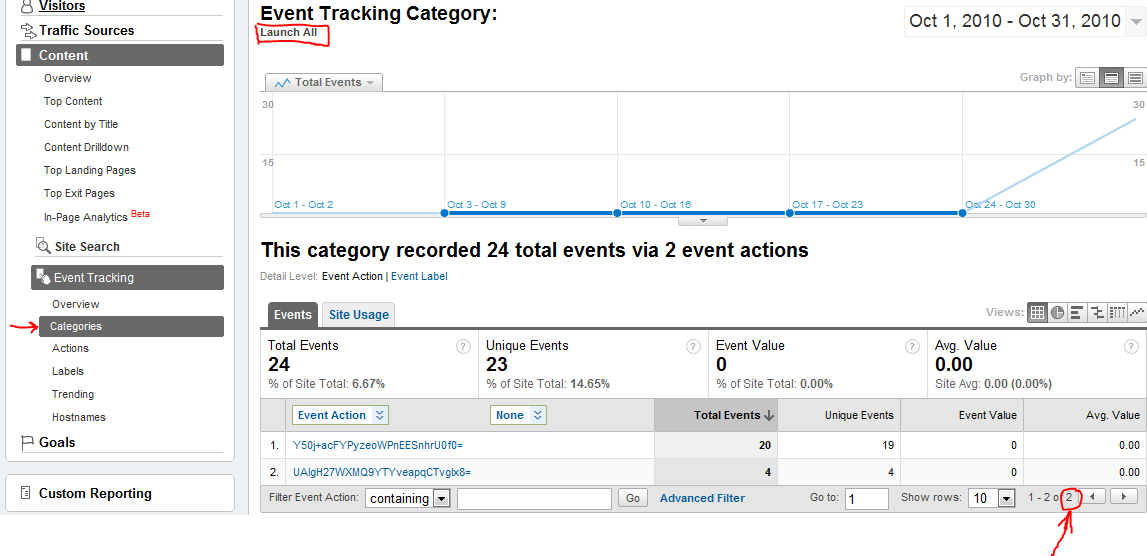
As you can see all app launches are tracked in the category "Launch All" and all paid launches in the "Launch Paid" category. This makes it easy to see all installations and all sales directly. Needless to mention that Launch Trial = Launch All - Launch Paid.
You can check if all works with the Fiddler or the TCPView tool while using the Windows Phone emulator. By the way, the tracking is pretty fast. I measured 20 to 40 ms for each Track call when the phone was connected to Wi-Fi.

The tracked events are best viewed when grouped by categories. The screenshot below shows a test with multiple launches of a phone and the emulator. The total number of events is listed at the bottom right of the table. Note that Unique Events aren't significant here since they only represent unique events for one session.

The id (event name) we supply through the AnalyticsEvent is mapped to the Google Analytics Event Action. You can find all event mappings and more info in the relevant Silverlight Analytics Framework documentation.

Conclusion
The update I submitted to the Marketplace works nicely and I hope to see some meaningful statistics in the next weeks. I think the described method is a good way to track your sales and other statistics until the App Hub team provides the official usage / sales statistics. Actually the provided tracking functionality is even useful when the App Hub team provides official statistics. And it's all free without a limited timeframe.

Monday, November 1, 2010

Silverlight is not dead and not undead either

No, it's alive and kicking.
You might have heard about the rumors that came up after the PDC conference and Bob Muglia's interview with Mary Jo Foley. Many people flooded Twitter and other sites with speculations that Silverlight is dead for the web. Microsoft's President of the Server and Tools Division Bob Muglia just clarified the situation.

"Make no mistake; we’ll continue to invest in Silverlight and enable developers to build great apps and experiences with it in the future."

You should also read the blog post from the Silverlight program manager Tim Heuer. Without a doubt he puts all his effort into the success of Silverlight. And not to forget the Microsoft Silverlight evangelist John Papa who also proves his commitment to Silverlight here.

Now let's get back to work...

The picture is an old poster from the movie Santo en el Museo de Cera with the famous Mexican lucha libre wrestler El Santo.

Monday, July 5, 2010

The Ultimate Gift Card - Two Visual Studio 2010 Ultimate MSDN Subscriptions To Give Away!

It's over, I picked two people from the comments that deserve the MSDN Subscription cards the most. Thanks!

I recently got three Visual Studio 2010 Ultimate MSDN Subscriptions cards from Microsoft. They are valid for one year, include the whole Ultimate features and can be used for development and testing purposes. Ultimate includes Visual and Expression Studio,Windows, Office, Windows Server, SQL Server, TFS, all other server products, ... and even some Azure benefits are packed in. Only the support and the MSDN magazine are excluded.
The one year Ultimate subscription is worth approximately $12,000! And the best thing, I have two cards left I can give away. What a great gift from Microsoft!

I want to give my two remaining cards to the Windows developer community. If you want one, just write a comment why you should get this great gift and make sure to include some form of contact information. Did I mention that these are full Ultimate subscriptions worth $12,000?
I will prefer people who make significant contributions in the .Net open source world. Of course, your chance is even better if these contributions are for Silverlight or Windows Phone 7.
After July 20th 2010 I'll pick two people that deserve the cards the most.

Here's a photo of the package I got. Yeah, it's real! And free, as in free beer!


Thanks a lot Microsoft!

Thursday, April 15, 2010

Silverlight 4 Up and Running

Woohoo! The final Silverlight 4 runtime and the developer tools for Visual Studio 2010 were released today and exactly three years ago the name Silverlight was officially introduced. A lot of great things happened in the Silverlight world since then and we now have a superb RIA platform at hand.

To get started with the Silverlight 4 development you only need Visual Studio 2010 and the Silverlight 4 Tools for Visual Studio. Don't forget, it's all free with the Visual Studio 2010 Express edition! The end-user runtime is available for Windows and Mac. As usual, Tim Heuer wrote a nice blog post about the Silverlight tools.

Past
The APIs haven't changed much since the last release candidate (RC) and exactly one month ago I wrote a summary of all the new features that were added since the Silverlight 4 Beta to the Silverlight 4 RC and the breaking changes. The post also contained some details about the CaptureSource's changed capture usage pattern. So if you used the Silverlight 4 Beta and skipped the RC, this post might be helpful.

Present
I installed the Visual Studio 2010 RTM build on Monday after it was released at Devconnections, the final Silverlight 4 Tools for Visual Studio today and recompiled all my Silverlight 4 samples and open source projects. It all worked like a charm and even on this machine were I had several betas of all the tools installed before. Kudos to the Visual Studio and the Silverlight team for making such great products.
My relevant Silverlight 4 blog posts, the SLARToolkit and the FaceLight CodePlex open source projects are now up to date.

Future
The first beta of the next Silverlight version will most certainly see the light this year. Make sure to vote or suggest new features at the silverlight.mswish.net site. The most important feature suggestion for me is the GPU accelerated 3D support that I suggested a while ago and which was consolidated into this suggestion. If you agree with me, you should vote for it.

Have fun with Silverlight 4!

Thursday, April 1, 2010

Microsoft Silverlight MVP Award

Today, I got an exiting Email from Microsoft:

Congratulations! We are pleased to present you with the 2010 Microsoft® MVP Award! This award is given to exceptional technical community leaders who actively share their high quality, real world expertise with others. We appreciate your outstanding contributions in Silverlight technical communities during the past year.

I hope it wasn't an April Fools' joke. ;-)

It's a real honor for me to get the Silverlight MVP award. All the Silverlight MVPs I know are truly outstanding and I can hardly believe I'm considered to be one of them now. It's even more surreal that I'm the first Silverlight MVP from Germany and the second from the DACH region after the excellent Laurent Bugnion.

I would like to thank Microsoft, the great Silverlight community and especially all that nominated me for the MVP award. It's needless to say that I will continue my work with Silverlight to provide more useful content and I hope I'll be able to satisfy the high expectations.

Thank you all!

Thursday, March 25, 2010

Coding4Fun - Silverlight Real Time Face Detection

A while ago Clint Rutkas (yes, the guy that built the awesome MIX T-Shirt cannon) asked me if I could write an article for Microsoft's Coding4Fun site. I felt honored and of course I agreed. Today I'm proud to announce that my first Coding4Fun article was published.


The article demonstrates how to implement a simple facial recognition system using Silverlight 4’s new webcam feature. The method I've implemented searches for a certain sized skin color region in a webcam snapshot. This technique is not as perfect as a professional computer vision library like OpenCV and the Haar-like features they use, but it runs in real time and works for most webcam scenarios.

The complete source code for the article is available at CodePlex and licensed under the Ms-PL.
If you like the article, I’ll write a follow-up that might cover a more stable (better) segmentation approach, how to optimize the performance further and more.

Update 04-06-2010
The article was translated into Russian and is available at the Russian Coding 4 Fun site.

Update 04-15-2010
Updated the application to the final Silverlight 4 RTW build.

Wednesday, November 4, 2009

Classic Rock evolved into Heavy Metal

Mihnea Balta released MetalScroll, a great replacement for the superb Visual Studio Add-In RockScroll:


MetalScroll is an alternative for RockScroll, a Visual Studio add-in which replaces the editor scrollbar with a graphic representation of the code. Compared to the original, this version has a number of improvements:

  • The widget at the top of the scrollbar which splits the editor into two panes is still usable when the add-in is active.
  • You must hold down ALT when double-clicking a word to highlight all its occurrences in the file
  • Lines containing highlighted words are marked with 5x5 color blocks on the right edge of the scrollbar, to make them easier to find (similar to breakpoints and bookmarks).
I have used RockScroll for a while, but encountered some bad Visual Studio crashs if I changed from code view to the Windows Forms Designer and as a consequence I had to uninstall it. Later I asked Scott Hanselman (@shanselman), who released RockScroll on his website, if he could contact the RockScroll author Rocky Downs and ask him for the source code, so I could fix it and might release it as open source, but Scott Hanselman never got an answer from the RockScroll author. You can imagine how pleasantly surprised I was after I had read the MetalScroll news from Johan Andersson (@repi) today.


My favorite feature is not the smart Scrollbar nor the cool splitter, it's the word occurrence highlighting, a feature that I missed since I worked with Eclipse years ago.
MetalScroll works with Visual Studio 2005 and 2008 and it's free and even open source! So don't hesitate, download and install this great Visual Studio add-in now. You won't be disappointed.

Thanks Mihnea Balta for your awesome work!

Monday, October 26, 2009

Silverlight Live Streaming being discontinued. What now?


The Microsoft Live team announced in a blog post that the Silverlight Streaming service is being discontinued. The Silverlight Streaming service offered free hosting for Silverlight applications and videos.


The blog post states:
"Microsoft Silverlight Streaming by Windows Live Beta is being discontinued and will eventually be taken down.
A new Windows® Azure(TM)-based hosting and delivery service will be launched by the end of 2009, though this is not a direct replacement for Silverlight Streaming and will have costs associated with its use."
Further they write:
"Don't panic! All your current content is safe and you will receive sufficient notice for you to make an informed decision on where to host your Silverlight content and applications. However, in the interim, we would like you to be aware of the following:

Effective immediately, no new sign-ups are permitted for the Silverlight Streaming service. In addition, the Silverlight Streaming publishing plug-in for Expression Encoder will no longer be available for download.
The new Windows Azure functionality will not be a direct replacement for the Silverlight Streaming service and will be a paid subscription service."


The blog post also gives some instructions on how to retrieve the hosted Silverlight content. One can't really say that the offered (Azure) "migration process" is comfortable and frictionless. Actually, as far as I know there is no real Azure migration service at the moment, one can only access the Silverlight Streaming file system and copy the content.

What now?
In my opinion this is not a very nice move of Microsoft for bloggers like me. I have used Silverlight Streaming to provide live examples for my Silverlight posts. I mainly blog about Silverlight development and provide content and source code for free, therefore I help Microsoft to spread their technology - for free. It's a shame that a free streaming service at least for personal / educational purposes like mine isn't offered anymore. I might see things too naive and got the intention of Silverlight Streaming wrong, but from my point of view it's definitely not nice.
For now I have uploaded the samples and Videos to my public Dropbox folder and stream them from there. Dropbox uses Amazon's S3 storage system to store files.
Timothy Parez (@delegatevoid) pointed me on this alternative and it actually works fine. Thanks Timothy!
I hope this blog post from the Silverlight Streaming team does not reflect the final decisions for Microsoft's Silverlight hosting. At least I can hope...